 PRIME MOTION
The design tree
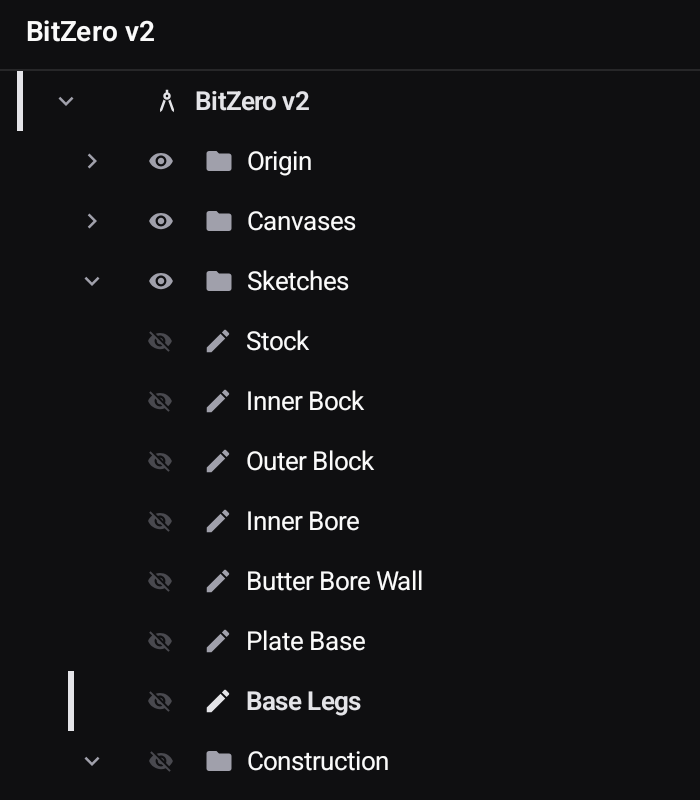
The panel behind the ☰ button at the top left is the design's contents — everything that exists in it, and everything is reachable from here.
What lives where
| Branch | Holds |
|---|---|
| Origin | The origin point and the three base planes — what everything else is ultimately built against |
| Canvases | Artwork brought in from a PDF, DXF, SVG or image to work over |
| Sketches | Every 2D sketch, in creation order |
| Construction | Planes, axes and points you created to build against — each kind in its own folder |
| Bodies | The solids and surfaces the features produced |
Construction sorts itself. Planes, axes and points each get their own folder inside it, so a dozen points can't bury the two planes you actually want. A folder only exists while it has something in it — no axes means no Axes folder at all, rather than an empty one — and each folder's eye switches just its own kind, leaving the others alone.
The design's own name sits at the root, and in Manufacturing an Operations branch joins the list, holding the tool runs and toolpaths built from the same geometry.

That single hierarchy is the point: geometry, the features built from it, and the toolpaths built from those are one document. Change a sketch and the body follows; change the body and the toolpaths are rebuilt against it.
Every row has an eye
Each row carries a visibility toggle. Hide the canvas once you have traced it, hide construction planes while you model, hide one body to see inside another. Nothing is deleted, and hiding a branch hides everything under it.
Health is shown in the tree
Sketches that need attention are marked rather than being silently wrong. A sketch that is under-constrained, or whose plane or references have changed, tells you here — which is far cheaper than discovering it when a feature rebuilds strangely.
A sketch marked with a ? has lost the plane it was drawn on. This happens to older designs where a sketch was drawn on a face and that face was later cut away: the sketch survived, the face did not. Nothing else in the design is affected — use Redefine Sketch Plane to give it a plane again, or Re-home to XY to drop it onto the origin plane.
Sketches you draw now keep their own plane, so cutting away the face they were drawn on no longer costs them anything.
What a row can do
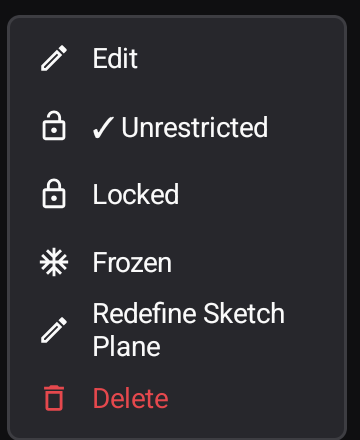
Each row's ⋮ menu holds what makes sense for that kind of item. A sketch offers:
- Edit — reopen it for sketching
- Unrestricted / Locked / Frozen — how much the sketch may change
- Redefine Sketch Plane — move an existing sketch onto a different plane or face, keeping the geometry
- Delete