 PRIME MOTION
Scripts
A macro is G-code behind a button. A script is different: it is a piece of Lua that reads what your machine is doing and answers one of three things.
| Answer | What it means |
|---|---|
CONTINUE | Carry on. Also what a script that answers nothing at all means. |
SKIP | The step this trigger gates has already been done, so the app must not do it as well. |
ABORT | Stop. Your reason is what the operator is shown. |
You write them where you already write things
Prime Motion does not have a code editor and is not getting one. Write a script in the editor you like, on the machine you like, and bring the file across.
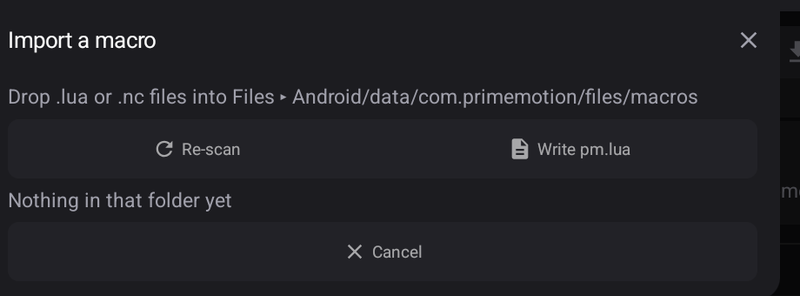
- Open Macros ▸ Import. The panel names the folder it watches — on an Android tablet that is
Android/data/com.primemotion/files/macros, reachable from the Files app; on a desktop it is a folder under your user's application data, and the panel shows the path. - Tap Write pm.lua once. That drops the whole
pm.*API into the same folder as Lua annotations, so any editor with a Lua language server gives you completions and hover documentation for every field — offline, no account, no plugin. - Drop your
.luafile in the folder. - Tap Re-scan, then Import on the row.
The copy inside Prime Motion is the one that runs. Editing the file afterwards changes nothing until you import it again, and the panel tells you when a name is already in the library.
The header
A script declares what it is and what it needs in a comment block at the top. It is read, never run — Prime Motion never has to execute your script to find out what it wants.
---@pm.name Tool wear check
---@pm.description Refuses when the tool has drifted from the length it last measured.
---@pm.category SAFETY_LOGIC
---@pm.requires A tool measured on this machine
---@pm.param limitMm number 0.20 The largest drift to tolerate, mm| Tag | What it does |
|---|---|
@pm.name | The name the macro appears under. |
@pm.description | One or more lines, joined. |
@pm.category | SETUP_PROBING, MACHINE_MANAGEMENT, PROGRAMMING_GEOMETRY, SAFETY_LOGIC or CUSTOM. |
@pm.requires | What the script needs to mean anything. Say it — see below. |
@pm.param | name type default description. Types are number, string, boolean. |
Every @pm. line must come before your first line of code. A declaration buried at line 200 is one nobody reading the top of the file would ever see.
Parameters are the part you edit in Prime Motion. The body is read-only here; what you change between one job and the next is a number in a field.
What a script can read
pm.lua lists all of it with documentation. The groups are:
| Group | What is in it |
|---|---|
pm.machine | State, work and machine position (mm), homed, feed, spindle, coolant, overrides, input pins |
pm.datum | Which work coordinate system is live, whether it is trusted, any G92 stacked on it |
pm.tool | What is in the collet, how long it measured here, how we know, what the offsets are anchored to |
pm.firmware | Grbl or grblHAL, version, board, planner depth |
pm.job | Whether a programme is running, how far, how many parts since you zeroed the counter |
pm.offsets | G54…G59, G28, G30, G92, TLO |
pm.modal | Parser modal state — pm.modal.units == "G21" |
pm.params | Your own declared parameters |
And five functions: pm.continueRun(), pm.skip(reason), pm.abort(reason), pm.log(message) and pm.pin(name).
Say what your script needs
If a script only works on grblHAL, or only with a speed-controlled spindle, put it in @pm.requires and refuse there. A guard that quietly does nothing on the wrong controller is worse than one you never installed — you will believe it is watching.
if pm.firmware.isGrblHal == nil then
  return pm.abort("Nothing has detected the controller family yet.")
end
if pm.firmware.isGrblHal == false then
  return pm.abort("This guard needs a spare grblHAL input, which this controller does not have.")
end
Test against the live machine
Test runs your script against your machine's real state, right now, and shows the verdict, the reason and everything you logged. It is the same code path an automated run uses — there is no separate, safer mode, because a script cannot do anything to test safely around.
Running away
A script that never finishes is stopped for you: Prime Motion counts the instructions it executes and the time it takes, and stops it at either bound. You will see ABORT with "Nothing was sent to the machine." You cannot switch this off, and a pcall around your loop will not catch it.
The samples
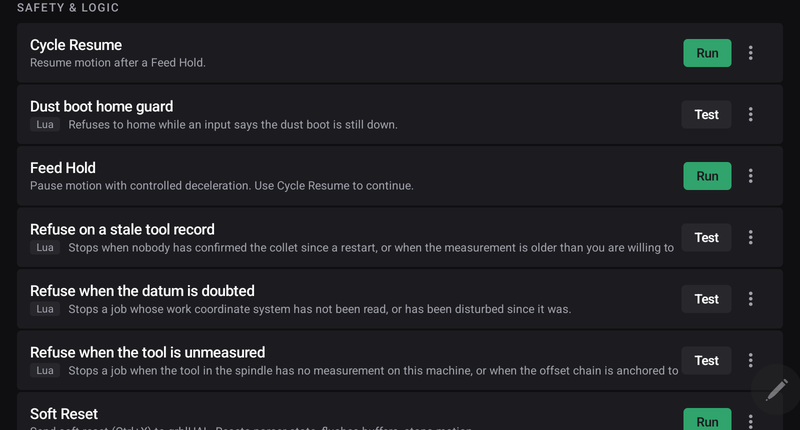
Eight scripts ship with the app, in the list with a Lua badge. Every one is:
- disabled — no trigger is bound to any of them, and taking an app update never starts one;
- read-only — editing one makes a copy that is yours, so an update can improve the original without changing what your machine does;
- honest about its preconditions, in the file.
Read them, copy the parts you want, and make them yours. Start with Read every fact (reference) — it reads the whole surface and logs it, so pressing Test on it tells you exactly what your machine is reporting right now.
The four that are not scripts
A script decides. Motion does not need a language — warming a spindle, parking at the end of a job, blowing chips before a tool change and stopping everything on an alarm are plain G-code, and they ship as ordinary macros. Each one names, in the file, the moment it is meant for.