 PRIME MOTION
The homing gate
If tabs along the bottom of the screen are greyed out and will not respond, nothing is broken. Prime Motion is refusing to let you reach anything that can move the machine until it knows where the machine is.


The three states
Prime Motion has exactly three gate states, and the bottom tab bar is the visible face of them.
1 · No machine profile yet — first launch
Only Wizards is reachable, plus the design tabs — and Help, which is never gated in any state.
The app cannot gate on travel limits, soft limits, or a homing cycle before it knows what machine it is talking to, so it does not pretend to. Wizards is the way in: it walks you through choosing a machine and creating the profile.
2 · Profile exists, machine not homed
| Reachable | Locked |
|---|---|
| Jog — to home it, and to move it under your own eye | Run |
| Tools — the tool library is just data | Projects |
| Wizards | Macros |
| Settings | History |
Those four are locked because each can start motion:
- Run streams a program.
- Projects streams a sequence of programs.
- Macros are stored G-code, and the whole point of a macro is that one tap executes it. There is no load step, no preview, no moment where you would notice something was wrong — you press it and the machine moves. Macros are also the code most likely to be written in machine coordinates (
G53moves to a tool-change position, a park position, a probe location), and machine coordinates are precisely what does not exist yet on an unhomed controller. - History is not merely a log: a past job can be re-run or resumed from it, so it is a launcher wearing a record's clothes.
Jog is deliberately not locked. Homing is itself a jog-screen action, so locking Jog would lock you out of the only thing that opens the gate — and moving under your own hand, watching the machine, is a different risk from streaming a program that will not stop to check.
Jog is not fully open either, though. Until you home, the screen carries this banner:

and the parts of the screen that depend on a real coordinate system are held back with it. Before homing, the action row offers only Home, the per-axis homing buttons, and two disabled controls:

After homing, Zero All and Probe come live, and two buttons that were not there at all appear — Save Position and Load Position:

Both are still greyed in that picture, and for two different reasons. Homing decides whether they exist; each then has its own condition deciding whether it is usable:
| Button | Appears | Becomes usable |
|---|---|---|
| Save Position | once homed | once you have jogged since connecting |
| Load Position | once homed | once at least one position has been saved |
Save Position waits for a jog because there is nothing worth recording until you have moved somewhere. Immediately after a homing cycle the machine is sitting at machine zero, and saving machine zero stores a position you can always return to by homing again. The button comes live the moment you jog away.
Load Position waits because an empty list is not worth opening.
Together these are the gate in miniature. A saved position is recorded in machine coordinates: before homing there is no machine coordinate system to record one against, and immediately after homing there is nothing yet worth recording. The app is not withholding a feature you might want — it is declining to store a number that would be meaningless or useless.
3 · Homed
Everything is reachable.
The design tabs are never gated
Design, Manufacturing and Parameters stay available in every state, including with no machine connected at all. Drawing, modelling, and generating toolpaths move nothing — you can do the entire design and CAM side of the work with no machine connected at all, and connect only when it is time to cut.
Opening the gate
- Connect to the machine, and confirm Settings → Connection reports
CONNECTED. - Go to Jog. The red banner reads Machine not homed — home all axes before jogging.
- Press Home. Prime Motion shows you which machine is about to move, and where its origin is, before anything happens:
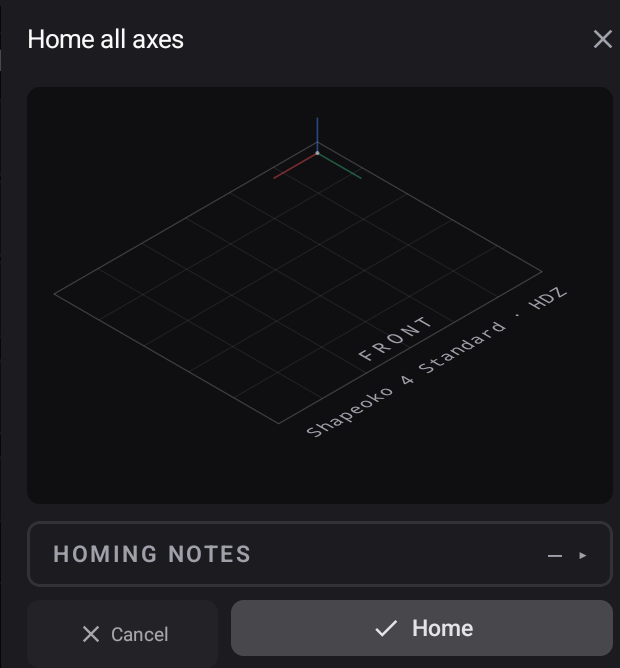
- Press Home on that panel. The machine runs its homing cycle and establishes machine zero.
- The banner clears and the four locked tabs come up.
Why the gate cannot simply be turned off
There is no setting for it, on purpose. Every protection downstream is expressed in machine coordinates: soft limits, travel limits, tool-change positions, saved work offsets, and the safe-Z retract. Before homing, those are numbers against an origin the controller invented at power-on. Running a program in that state does not produce a slightly-off part — it produces motion toward coordinates that have no relationship to the physical machine.
Related
- Machine profiles — what the app needs to know before it will gate on anything
- Soft limits and travel
- Work coordinates — what homing makes meaningful