 PRIME MOTION
Settings — Tooling
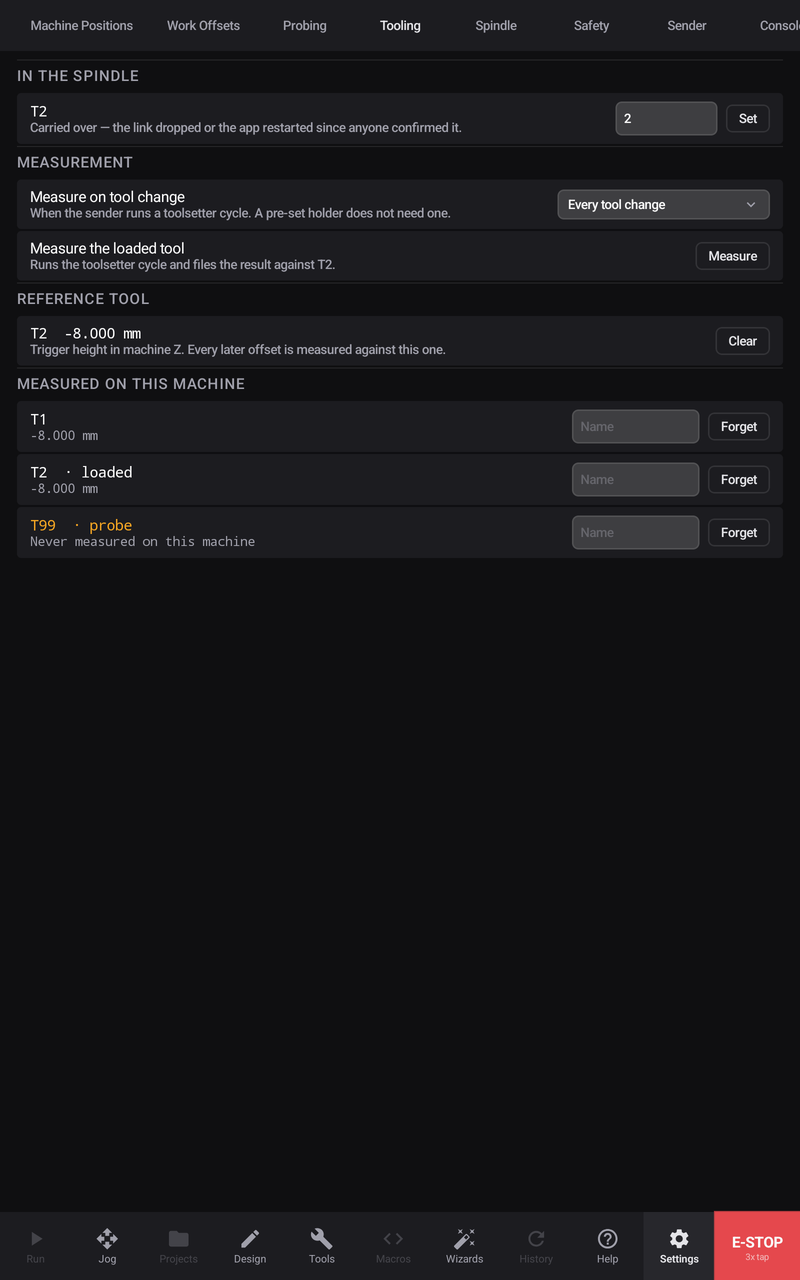
What is in the collet right now, and what every tool has measured on this machine. A measured length is a property of the tool and the machine it was measured in — the same cutter in two routers has two different numbers, and neither is wrong — which is why this tab is per-machine.
In the spindle
The tool the machine believes is loaded, with how it knows — a program's tool change, or your own declaration. If the number is wrong, declare the right one here; a measurement filed under the wrong tool number is a measurement that will later be applied to the wrong cutter.
Where a probe has its own tool number, the row says which number that is. The number itself is configured with the machine's other accessories in Settings → Connection.
Measurement
Measure on tool change decides when a toolsetter cycle runs:
| Mode | When the tool is measured |
|---|---|
| Every change | At every tool change — the safe default |
| On request | Only when you ask, with the button below |
| Never | Not at all — for pre-set holders whose length is already known |
Measure the loaded tool runs a measurement now, on whatever is in the collet. It needs a declared tool number first — a length has to be filed under the tool it belongs to.
Reference tool
The tool the offset chain is measured against: every other tool's offset is the difference between its measured length and this one's. The row shows which tool holds the reference and lets you clear it when it no longer describes anything — after that, the next measurement establishes a new one.
Measured on this machine
Every tool that has been measured here, with its number, its label and its measured height. A tool can be relabelled so the list reads in your words, and Forget removes a record that no longer applies — a reground cutter is effectively a new tool.
Related
- Tool changes
- Settings — Connection — the toolsetter and probe accessories
- Tools — the tool library itself