 PRIME MOTION
Settings — Spindle
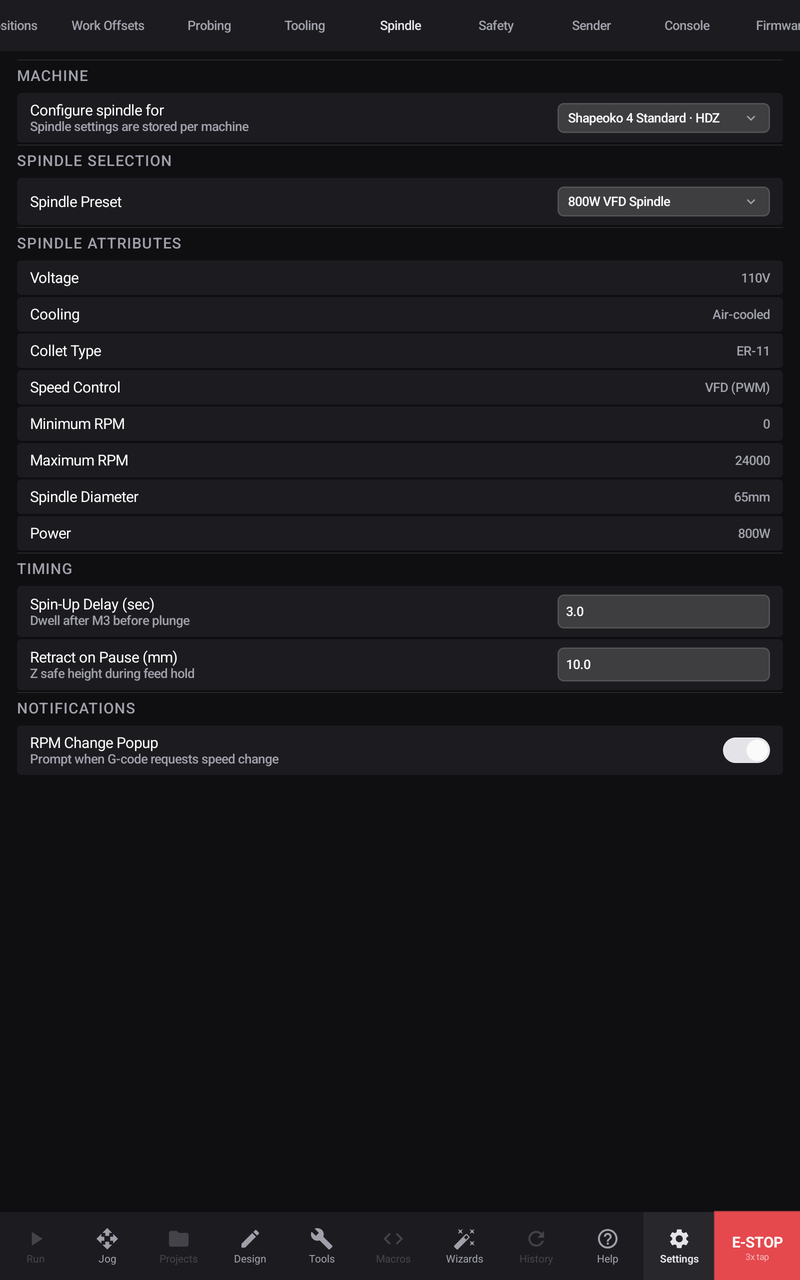
What is turning the cutter, and what the app should assume about it.
Choosing your spindle
Pick the spindle or router actually fitted. The choice is stored with the machine, so profiles for different machines can carry different spindles.
Selecting it fills in the rest: voltage, cooling, collet type, speed range, power, and — most importantly — how speed is controlled.
How speed is controlled
This is the entry worth understanding, because it decides whether spindle commands in your programs do anything at all.
| Control | What it means |
|---|---|
| PWM / VFD | The controller commands the speed. Programs work as written. |
| Relay on/off | The controller can start and stop it, but not set a speed. |
| Manual dial | You set RPM by hand. Speed commands in a program do nothing. |
Speed range
Minimum and Maximum RPM describe what your spindle can actually do. They matter because CAM uses them: a toolpath asking for a speed outside the range is a toolpath you cannot run as written.
Timing
Spin-up delay is how long to wait after starting the spindle before cutting. Long enough for it to reach speed — cutting during spin-up loads the tool at the wrong RPM.
Retract on pause is how far Z lifts when a job is held, so a paused cutter is not resting in the work.